A Complete Explanation of eBay Selling Limits
 Leo Rothstein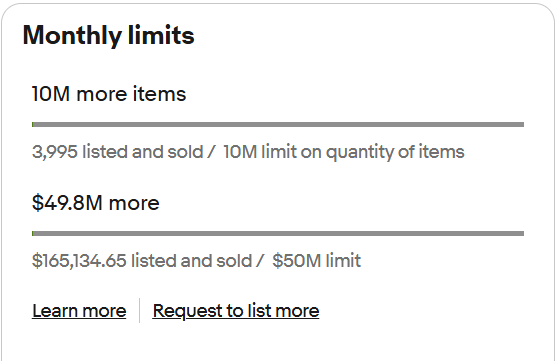
New sellers often view eBay selling limits as a barrier to growth: however, these caps are designed to protect the marketplace and ensure sellers can fulfill orders reliably as they scale. Understanding how these limits function allows you to navigate them strategically rather than hitting an unexpected speedbump
Selling limits are a monthly cap on two specific metrics: the total quantity of items you have listed and the cumulative dollar value of those listings. By managing these effectively, you demonstrate to eBay that your business is stable and ready for higher volume.
eBay sets monthly limits to manage risk and maintain buyer trust. These limits apply to your account across all listings, and it is important to distinguish between the various types you may encounter:
- Account Limits: These are the primary restrictions on the total number of items and the total dollar value you can sell each month.
- Category Limits: If you have high return rates in a specific category, such as Electronics or Designer Clothing, eBay may apply temporary restrictions until you have established a successful track record in that specific niche.
- Listing Accuracy: It is vital to list items in their correct categories. Miscategorizing items to bypass these restrictions is a violation of eBay policy and can lead to account sanctions.
While eBay limits both quantity and value, it is worth noting that Infinity also has listing caps based on your subscription plan. However, these typically only limit the number of items managed, not their total dollar value.
You can monitor your current listing capacity through the eBay Seller Hub. By scrolling to the Monthly Limits section under the Overview tab, you will find a real-time display of your remaining capacity for the month.
When calculating your remaining limit, remember that Good ’Til Cancelled (GTC) listings count toward your monthly total every time they renew. If you exceed your limit, eBay may automatically end listings or prevent you from creating new ones until the next billing cycle or until a limit increase is granted.
Increasing your limits is a matter of proving reliability and customer satisfaction. There are three primary ways to grow your listing capacity:
Automatic Reviews: eBay periodically reviews seller accounts. If you maintain strong performance metrics, such as consistent on-time shipping, minimal cancellations, and positive feedback, your limits may increase automatically without any action on your part.
Converting Account To Business Account: If you convert your personal eBay seller account to a business eBay seller account, it's possible that your selling limit will be raised on the spot.
Manual Requests: If your business is growing faster than the automatic reviews allow, you can manually request an increase through the Monthly Limits section of your Seller Hub. When you request a manual increase, eBay looks for:
- Positive Feedback: A history of satisfied customers.
- High Performance Standards: Adherence to Top Rated or Above Standard seller levels.
- Inventory Verification: Proof that you can handle the increased volume you are requesting.
Direct Support Consultation: You can also contact support and chat with an eBay representative. In certain instances, an agent might review your account and raise the limit on the spot: however, it is important to manage expectations. Most agents will defer to the automated system’s findings if the account does not yet meet the necessary performance thresholds.
Selling limits are not permanent. By focusing staying on top of your orders and maintaining high performance metrics, you provide the evidence eBay needs to unlock higher caps. Treat your selling limits as a roadmap for growth: as you consistently improve as a seller, your limits will follow.
For a deeper look at the rules governing seller behavior, refer to the official eBay Selling Limits Policy.